
Introduction
Innomesh Room Manager v3.6.0 introduces dynamic hostnames, a feature powered by JSONata that lets you define device hostnames as live expressions rather than static text. Instead of manually typing a hostname for every device in every room, write an expression once and let Room Manager resolve it automatically from the room’s configuration.
This eliminates repetitive data entry, reduces typos, and ensures hostnames stay consistent when room names change. Combined with room templates, dynamic hostnames can fully automate device naming at deployment time.
Key Concepts
What is JSONata?
JSONata is a lightweight query and transformation language for JSON data. Room Manager uses a subset of JSONata to let you reference and transform values from a room’s configuration JSON. You do not need to learn the full JSONata specification to use dynamic hostnames, but the full language is available if you need advanced transformations. For a complete language reference, see the official JSONata documentation. For a summary of common variables and functions, see the Appendix: JSONata Quick Reference.
Expressions vs Static Text
A hostname field in Room Manager can contain either:
- Static text: a fixed string you type directly (e.g.,
mtg-room-codec.uni.edu.au). - Dynamic expression: a JSONata expression wrapped in
{% %}delimiters that resolves to a value at runtime (e.g.,{% configuration.Properties.Room Name%}.uni.edu.au).
You can mix both in a single hostname field. For example: codec-{% $lowercase(configuration.Properties.Room Name) %}.uni.edu.au would produce codec-abc-01-123.uni.edu.au if the room name is “ABC-01-123”.
Visual Feedback
Room Manager provides clear visual cues so you can distinguish dynamic hostnames from static ones:
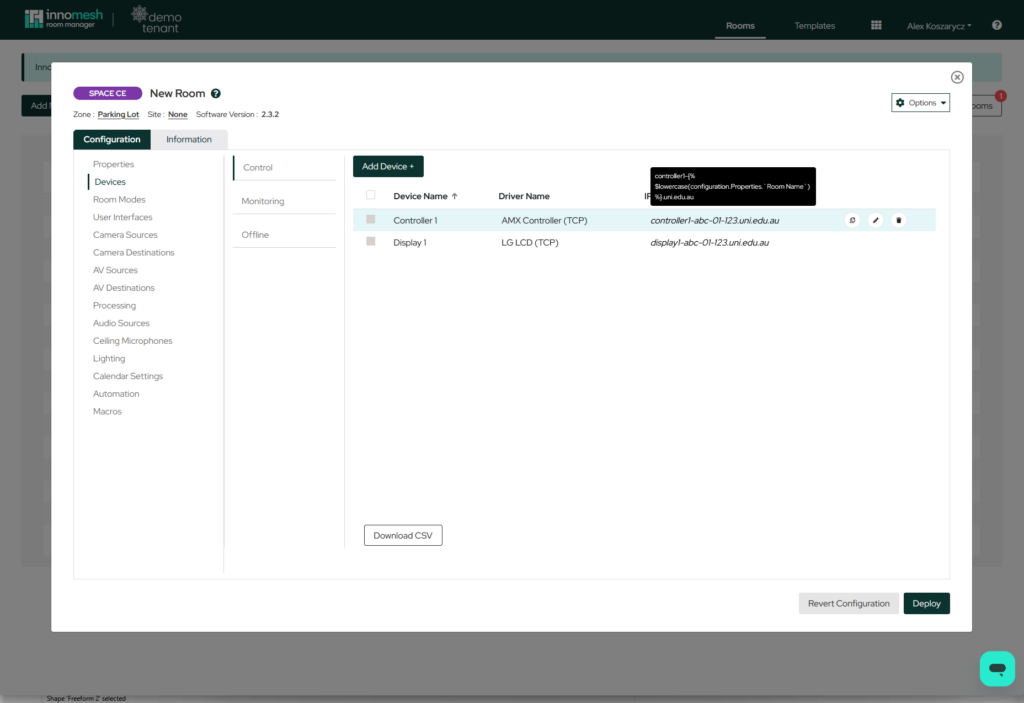
- Hostnames populated by an expression appear in italics.
- Hovering over an italicised hostname displays the original unresolved expression as a tooltip.
How It Works
Expression Syntax
Wrap any JSONata expression in curly braces and double percentage signs:
{% expression %}
A single hostname field can contain multiple expressions alongside static text:
prefix-{% expression1 %}-{% expression2 %}-suffix
Room Manager evaluates each expression independently and concatenates the results with the surrounding static text to produce the final hostname.
Referencing Room Properties
The prefix you use to reference room properties depends on the room type:
| Room Type | Prefix | Room Name Expression |
|---|---|---|
| SpaceCE / VC | configuration |
{% configuration.Properties.Room Name %} |
| Site / Pulse | monitoring |
{% monitoring.room_name %} |
Note: If a property name contains spaces (e.g., “Room Name”), you must wrap it in backticks:
`Room Name`. This is standard JSONata syntax for escaping field names.
Data Transformations
Raw room property values often need adjustment before they make valid hostnames. JSONata provides built-in functions for this:
Lowercase
Convert a value to lowercase using $lowercase():
{% $lowercase(configuration.Properties.`Room Name`) %}
If the room name is “ABC-01-123”, this resolves to abc-01-123.
Character Replacement
Replace invalid hostname characters using $replace():
{% $replace(configuration.Properties.`Room Name`, ".", "-") %}
If the room name is “L3.Boardroom”, this resolves to L3-Boardroom.
Chaining Transformations
Nest functions to apply multiple transformations in a single expression:
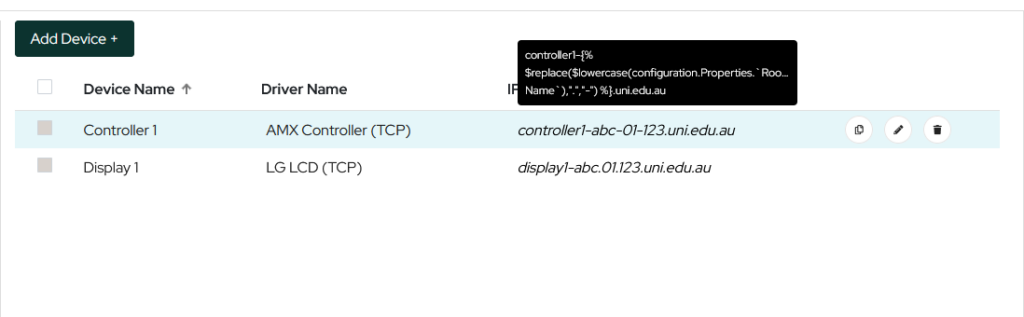
{% $lowercase($replace(configuration.Properties.`Room Name`, ".", "-")) %}
If the room name is “L3.Boardroom”, this resolves to l3-boardroom. The inner $replace() runs first (dots become dashes), then $lowercase() converts the result.
Live Updates
Because expressions are live references, they re-evaluate whenever the source value changes. If you rename a room, every device hostname that references the room name updates automatically. There is no need to visit individual device records to propagate the change.
Warning: Renaming a room will immediately change all dynamically-referenced hostnames. If downstream systems (DNS, monitoring, certificates) depend on specific hostnames, update those systems after renaming.
Template Integration
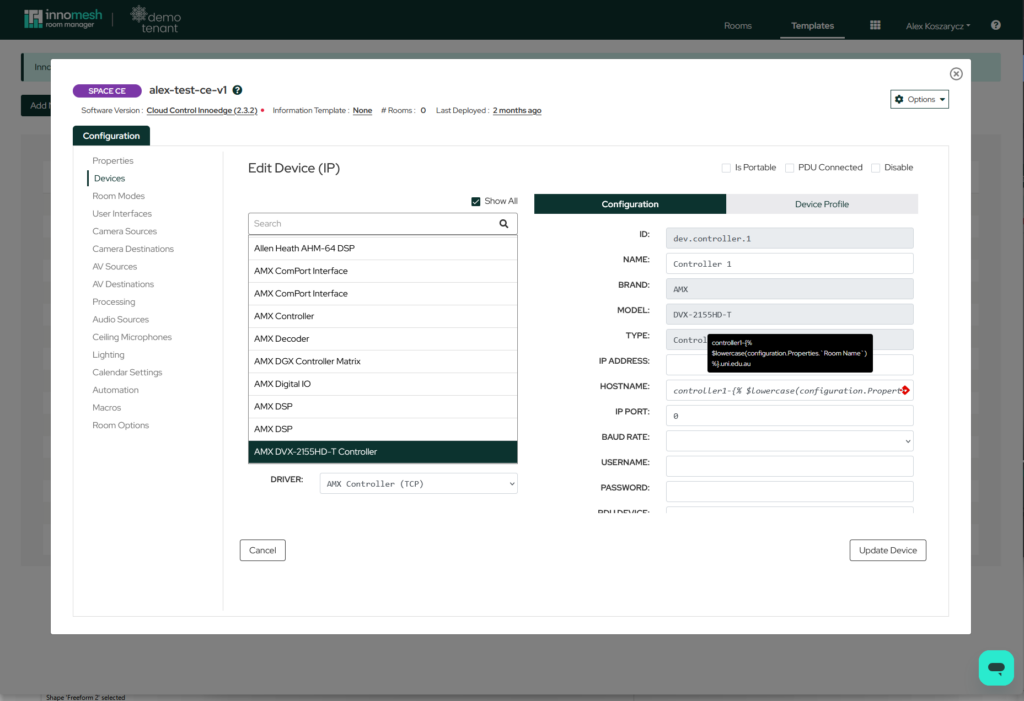
Dynamic hostname expressions can be included in room templates. When a new room is created from a template, every device hostname defined with an expression is automatically resolved using the new room’s name and configuration.
This means deploying a new room from a template can produce fully configured device hostnames without ever visiting the Devices page. For organisations with standardised naming conventions, this significantly accelerates room provisioning.
Testing Expressions Externally
For complex expressions, you can verify your JSONata logic before applying it in Room Manager:
- Open the JSONata Exerciser at try.jsonata.org.
- Paste your room’s configuration JSON into the left panel.
- Enter your expression (without the
{% %}delimiters) in the expression field. - Review the output to confirm the result matches your expected hostname.
Note: When testing on the JSONata website, enter only the expression itself (e.g.,
$lowercase(configuration.Properties.Room Name)). The{% %}delimiters are Room Manager syntax and are not part of the JSONata language.
Roadmap
Dynamic referencing is planned to expand beyond hostnames. Future updates aim to support expressions in other configuration areas, such as automatically linking device IDs to switchers. This will further reduce manual configuration and improve consistency across room deployments.
Related Articles
- Room Templates in Innomesh Room Manager
- Managing Devices in Innomesh Room Manager
- Room Types: SpaceCE, VC, Site, and Pulse
Appendix: JSONata Quick Reference
Common Variables
The following table lists the most frequently referenced configuration properties in dynamic hostname expressions:
| Variable | Room Types | Expression | Example Value | Hostname Example | Resolved Value |
|---|---|---|---|---|---|
| Room Name | SpaceCE / VC | configuration.Properties.Room Name“ |
ABC-01-123 |
display1-{% configuration.Properties.Room Name %}.uni.edu.au |
display1-ABC-01-123.uni.edu.au |
| Room Name | Site / Pulse | monitoring.room_name |
ABC-01-123 |
display1-{% monitoring.room_name %}.uni.edu.au |
display1-ABC-01-123.uni.edu.au |
| Site | SpaceCE / VC | configuration.Properties.Site |
CAN |
{% $lowercase(configuration.Properties.Site) %}-codec.uni.edu.au |
can-codec.uni.edu.au |
For example, to build a hostname that includes the site prefix and room name: {% $lowercase(configuration.Properties.Site) %}-{% $lowercase(configuration.Properties.Room Name) %}.uni.edu.au would produce can-abc-01-123.uni.edu.au when the Site is “CAN” and the Room Name is “ABC-01-123”.
Common Functions
The following table summarises the JSONata functions most commonly used in dynamic hostname expressions:
| Function | Purpose | Example | Result |
|---|---|---|---|
$lowercase(str) |
Convert to lowercase | $lowercase("Boardroom") |
boardroom |
$uppercase(str) |
Convert to uppercase | $uppercase("Boardroom") |
BOARDROOM |
$replace(str, old, new) |
Replace characters | $replace("L3.Room", ".", "-") |
L3-Room |
$trim(str) |
Remove leading/trailing whitespace | $trim(" Room ") |
Room |
$substring(str, start, length) |
Extract a portion of a string | $substring("Boardroom", 0, 5) |
Board |
For the full JSONata function library, refer to the JSONata String Functions documentation.