
Preview Feature — The Platform API is currently available in Preview. Functionality may change, and this feature may become chargeable in a future release. Contact your Innomate account manager for more information.
The Innomesh Platform API is a secure, versioned REST API that enables external systems to integrate directly with the Innomesh platform. It is designed for third-party platform integrations, workflow automation, AI-driven use cases, and partner extensibility — without requiring access to the Innomesh Portal or Room Manager applications.
Use cases include:
- Integrating Innomesh room and asset data into third-party platforms such as ServiceNow, building management systems, or IT service desks
- Automating monitoring and alerting workflows using external orchestration tools
- Building custom dashboards and reports powered by live Innomesh data
- AI and machine learning applications that consume room status, occupancy, or asset health data
For a complete list of available endpoints and request/response schemas, refer to the Innomesh Platform API OpenAPI Specification.
Key Concepts
App Client
An App Client is a named credential set that represents an external system connecting to the Platform API. Each App Client has a unique Client ID and Client Secret, which are used to obtain a short-lived access token via OAuth 2.0.
App Clients are created and managed by Portal administrators under Users > App Clients.
Permission Scope
A Permission Scope controls which categories of API endpoints an App Client is authorised to access. Scopes are assigned at the top-level resource path. Available scopes include:
| Scope | API Paths Accessible |
|---|---|
rooms | All endpoints under /v1/rooms/... |
assets | All endpoints under /v1/assets/... |
alerts | All endpoints under /v1/alerts/... |
metrics | All endpoints under /v1/metrics/... |
An App Client may be granted one or more scopes. Requests to endpoints outside the App Client’s assigned scope will be rejected.
Access Token
An Access Token is a short-lived OAuth 2.0 bearer token that must be obtained before making any API call. Tokens are valid for 2 hours and must be refreshed after expiry. Token requests are made directly to the tenant-specific Cognito authentication endpoint.
Best practice — Persist the access token and reuse it across API calls for its full 2-hour lifetime. Requesting a new token for every API call is strongly discouraged — token generation is throttled, and an integration that does this will likely exhaust the token request limit and begin failing. Only request a new token once the current one has expired.
API Key
An API Key must be included in every API request as an HTTP header (x-api-key). The API Key is provisioned by Innomate — submit a support ticket to UXT Support to request one for your tenant.
Rate Limits
The Platform API enforces rate limits and a daily request quota per API key. The specific rate and burst limits are subject to change as Innomate monitors usage and costs during the Preview period. A daily quota of 1,000 requests per day applies by default.
If your integration requires a higher quota, contact Innomate to discuss an increased usage plan.
Getting Started
Step 1 — Create an App Client
Administrator access required — Only Portal users with administrator privileges can create and manage App Clients.
- Sign in to the Innomesh Portal.
- Navigate to Users in the left-hand navigation, then select the App Clients tab.
- Click Create New.
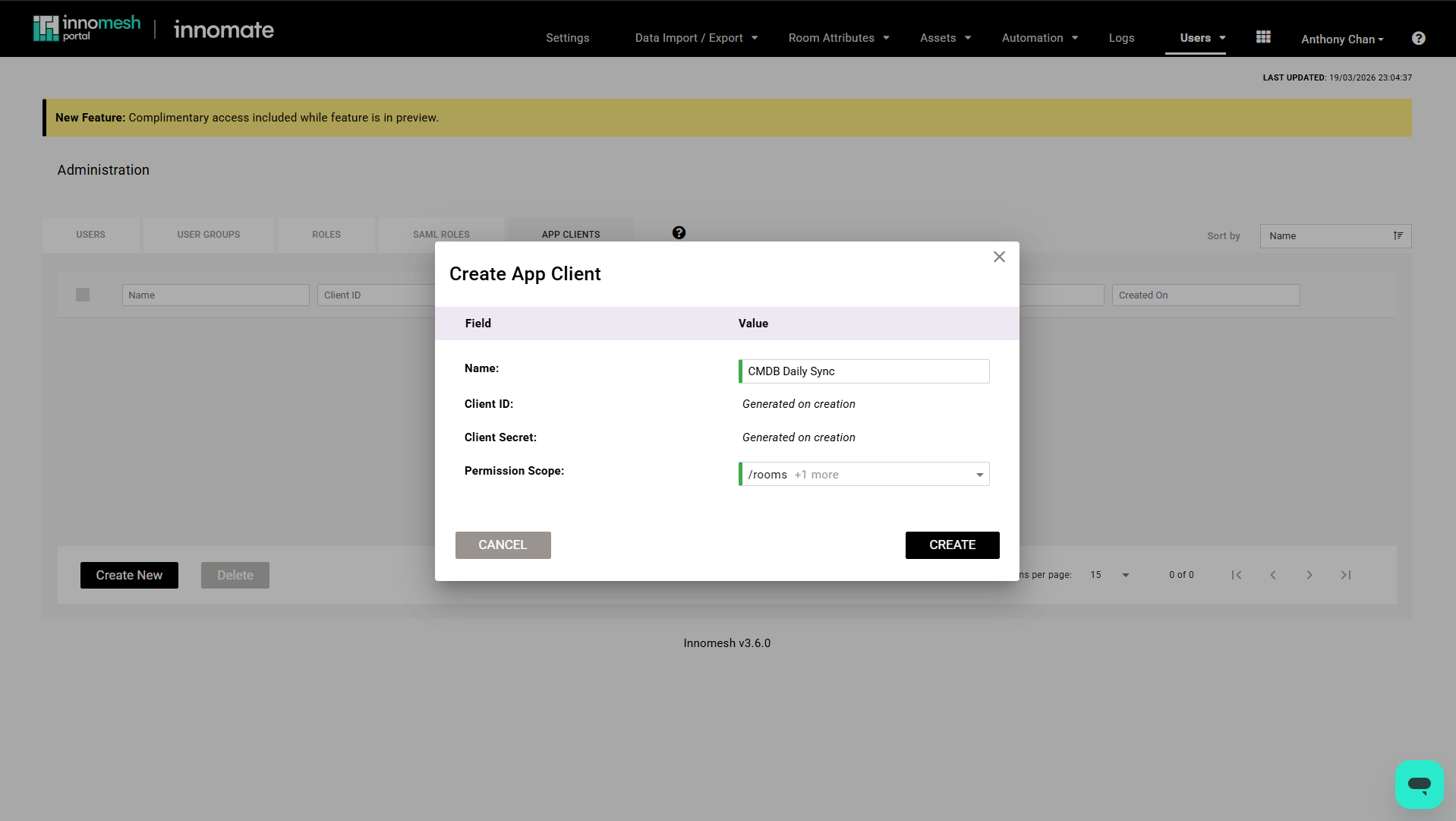
- Enter a Name for the App Client. This name identifies the App Client in audit logs and the management list. It cannot be changed after creation.
- Select one or more Permission Scopes from the dropdown to define which API endpoint categories this App Client may access.
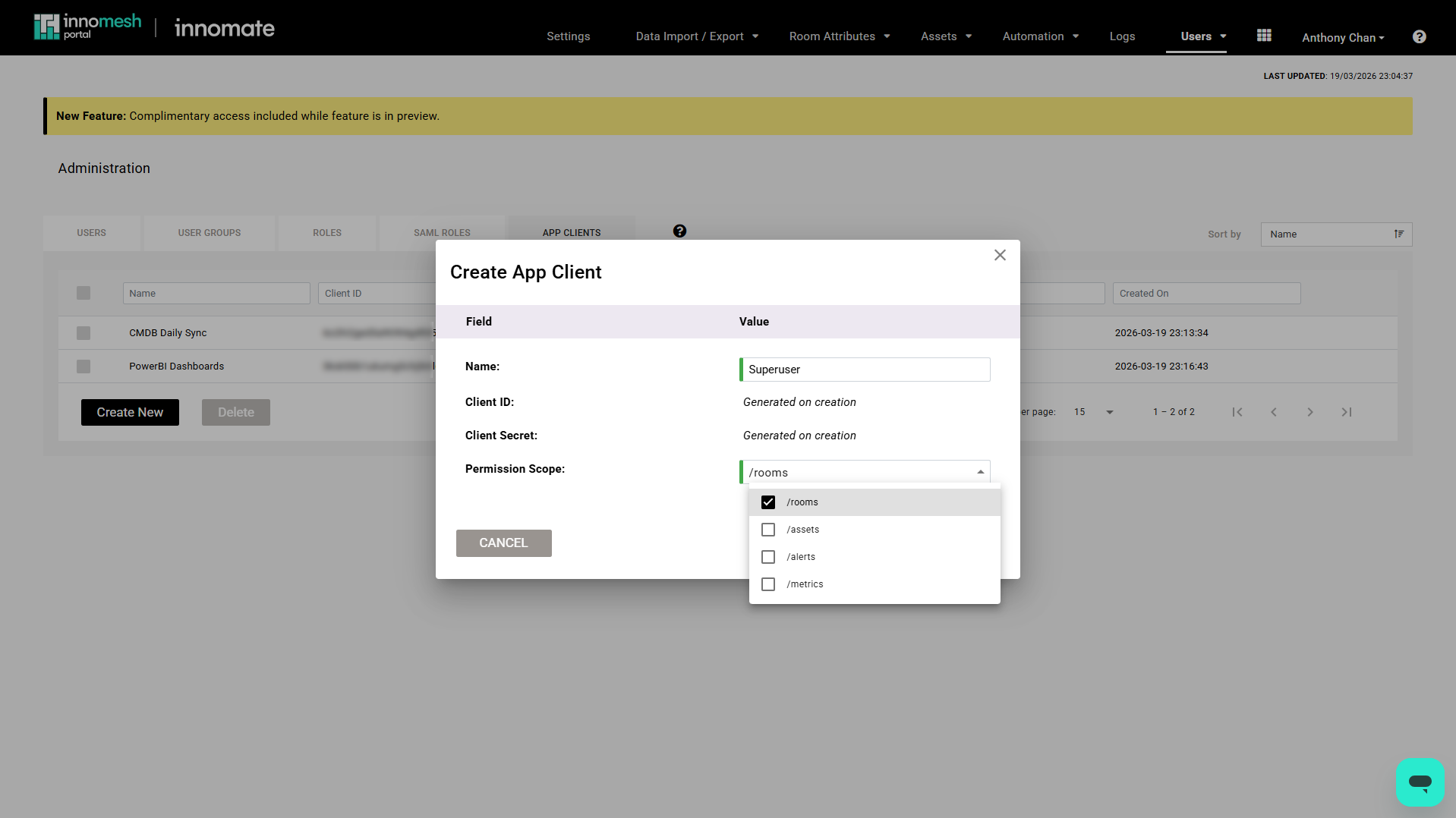
- Set an Expiry date if required, or leave blank for no expiry.
- Click Create.
On success, the following credentials are displayed:
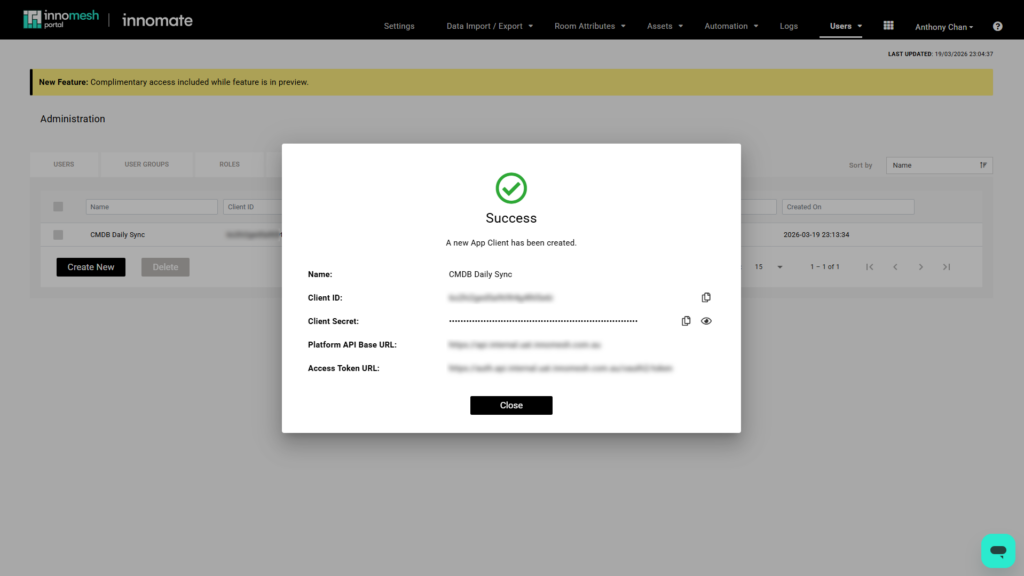
| Credential | Description |
|---|---|
| Client ID | The OAuth 2.0 client identifier for this App Client |
| Client Secret | The OAuth 2.0 client secret — shown once only |
| Platform API Base URL | The base URL for all API requests (e.g. https://api.<tenant>.innomesh.com.au) |
| Access Token URL | The OAuth 2.0 token endpoint for requesting access tokens |
Important — The Client Secret is displayed only once at the time of creation. Store it securely in a secrets manager or credential vault immediately. It cannot be retrieved again.
Step 2 — Obtain an API Key
An API Key is required to authenticate every API request. API Keys are provisioned by Innomate and are not generated through the Portal.
To obtain an API Key, submit a support ticket to UXT Support requesting Platform API access for your tenant.
Step 3 — Request an Access Token
Before making any API call, obtain a short-lived access token using the OAuth 2.0 Client Credentials flow.
Send a POST request to the Access Token URL provided at App Client creation:
curl -X POST https://auth.api.<tenant>.innomesh.com.au/oauth2/token \
  -H "Content-Type: application/x-www-form-urlencoded" \
  -d "grant_type=client_credentials&client_id=<CLIENT_ID>&client_secret=<CLIENT_SECRET>"
Replace <tenant>, <CLIENT_ID>, and <CLIENT_SECRET> with the values from your App Client credentials.
A successful response returns a JSON object containing an access_token:
{
  "access_token": "eyJraWQiOiJ...",
  "expires_in": 7200,
  "token_type": "Bearer"
}
Access tokens expire after 2 hours (expires_in: 7200). Persist the token and reuse it for the duration of its lifetime — only request a new token once it has expired.
Step 4 — Make an API Call
Include the access_token as a Bearer token in the Authorization header, and the API Key in the x-api-key header, with every request.
The following example retrieves the live status of a specific room:
curl -X GET https://api.<tenant>.innomesh.com.au/v1/rooms/<roomid>/status \
  -H "Authorization: Bearer <ACCESS_TOKEN>" \
  -H "x-api-key: <API_KEY>"
Replace <tenant>, <roomid>, <ACCESS_TOKEN>, and <API_KEY> with your values.
A successful response returns the live room state:
{
  "System Version": "2.5.0",
  "Room Name": "RES-CCLHD-WYON-BlockH-L04-MeetRm1-VC",
  "Room Type": "MEET-30",
  "Power Is On": true,
  "Room Occupied": false,
  "In Active Call": false,
  "Websocket Connected": true,
  "Websocket Communicating": true
}
For the full list of available endpoints, parameters, and response schemas, refer to the OpenAPI Specification.
Managing App Clients
Viewing App Clients
- Navigate to Users in the left-hand navigation.
- Select the App Clients tab.
The App Clients list displays all App Clients configured for your tenant:
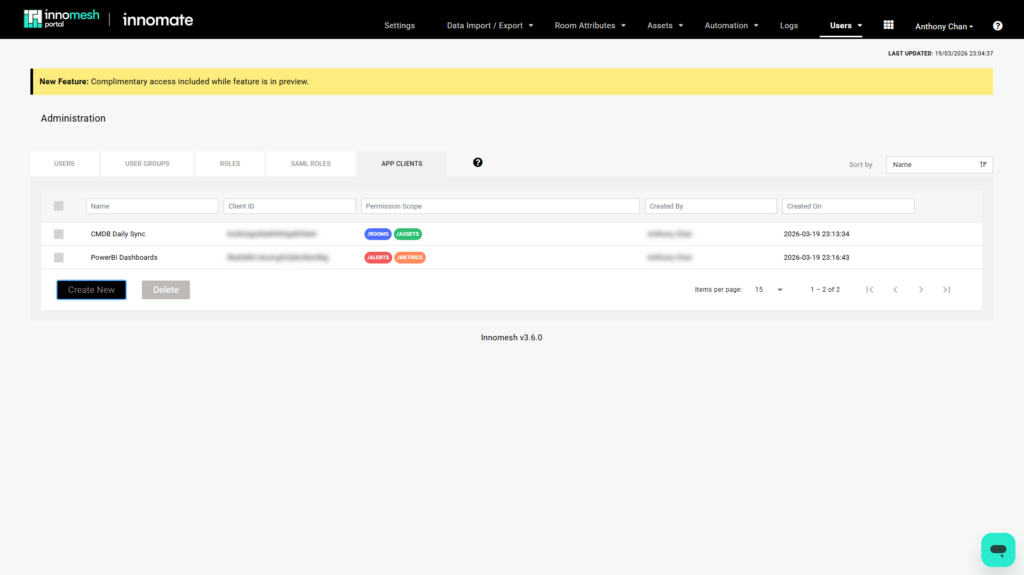
| Column | Description |
|---|---|
| Name | The display name assigned at creation |
| Client ID | The OAuth 2.0 client identifier |
| Permission Scope | The API endpoint categories this App Client can access |
| Created By | The Portal user who created the App Client |
| Created On | The date and time the App Client was created |
Editing an App Client
- On the App Clients list, click the edit (pencil) icon on the row for the App Client you wish to modify.
- Update the Permission Scope or Expiry as required.
- Click Save.
Note — The App Client Name is fixed and cannot be changed after creation. To rename an App Client, delete it and create a new one.
Deleting an App Client
- On the App Clients list, select one or more App Clients using the checkboxes on the left of each row.
- Click Delete.
- Review the confirmation dialogue and click Confirm to proceed.
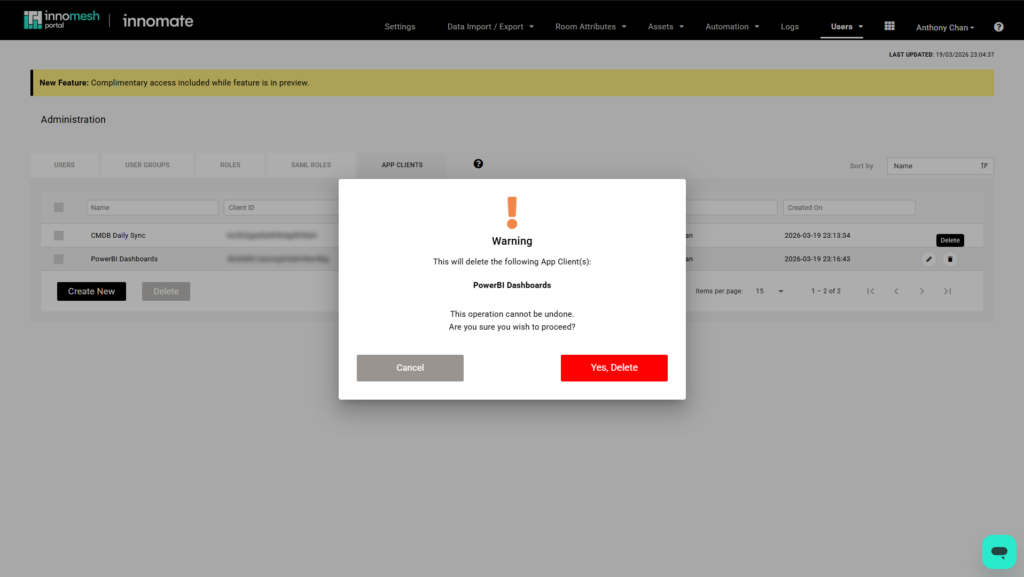
Warning — Deleting an App Client immediately and permanently revokes access for any external system using those credentials. This action cannot be undone. Ensure any dependent integrations are updated before deleting.
Available API Endpoints
The following table lists the endpoints available in the current release. For full request parameters and response schemas, refer to the OpenAPI Specification.
| Endpoint | Description | Permission Scope Required |
|---|---|---|
GET /v1/rooms/{roomid}/status | Live status for a specific room | rooms |
GET /v1/assets/{roomid}/{assetid} | Asset information (static and slowly-changing properties) | assets |
GET /v1/assets/{roomid}/{assetid}/status | Live status for a specific asset | assets |
GET /v1/assets/{roomid}/{assetid}/alerts | Active alerts for a specific asset | assets |
GET /v1/assets/{roomid}/{assetid}/alerts_history | Recent alert history for a specific asset | assets |
GET /v1/alerts/{alertid}/details | Full details for a specific alert | alerts |
For full request parameters, response schemas, and example payloads, refer to the OpenAPI Specification.
Audit Logs
All Platform API calls are recorded in the Innomesh Portal audit log, providing full traceability of which App Client called which endpoint and whether the request succeeded or was rejected.
Viewing Platform API Audit Logs
- Navigate to Audit Logs in the Portal.
- In the Log Type dropdown, select Platform API logs only to filter the view to Platform API activity.
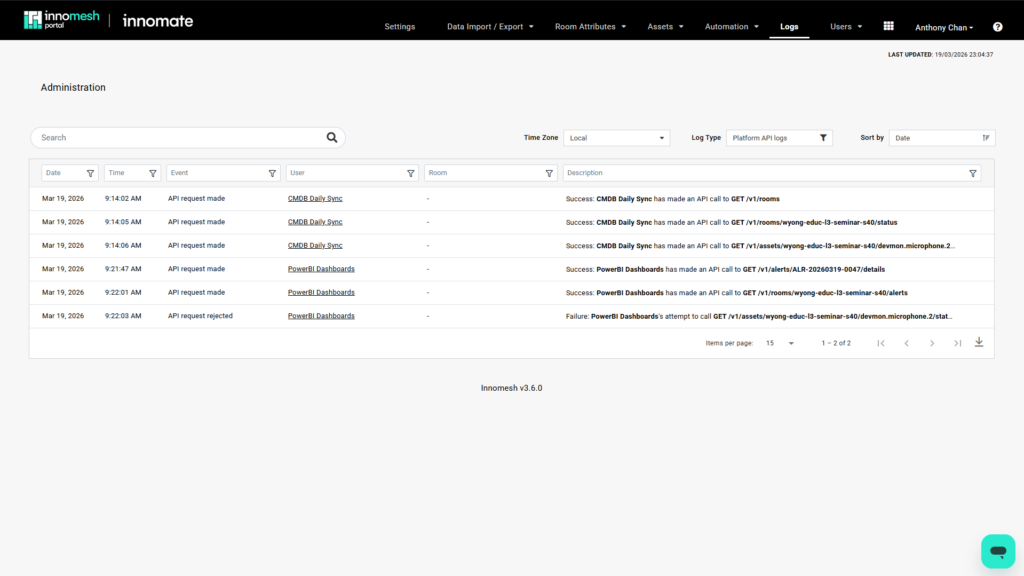
Each log entry includes:
| Field | Description |
|---|---|
| Event | API request made (success) or API request rejected (failure) |
| User | The name of the App Client that made the request |
| Description | The endpoint called and outcome — e.g. CMDB Daily Sync has made an API call to GET /v1/rooms/wyong-educ-l3-seminar-s40/status |
| Timestamp | Date and time of the request |
Limitations and Notes
The following limitations apply to the Platform API in its current Preview release:
- Preview status — The Platform API is available as a Preview feature. Behaviour may change, and this feature may become chargeable in a future release.
- Rate limits — Rate and burst limits apply and are subject to change during the Preview period. A default daily quota of 1,000 requests per day applies. Contact Innomate if your integration requires a higher quota.
- Client Secret is shown once — The Client Secret is displayed only at the time of App Client creation. It cannot be retrieved afterwards. Store it securely immediately.
- Token expiry — Access tokens expire after 2 hours. Persist the token and reuse it — do not request a new token on every API call, as token generation is throttled.
- App Client deletion is immediate — Deleting an App Client immediately revokes access. There is no grace period.
- Versioning — All endpoints are versioned (e.g.
/v1/...). Innomate will provide advance notice before deprecating any API version.