
Automation
The Automation section of the room configuration allows you to define how sources are automatically routed under different conditions. There are two main types of automated routes. It also defines how EWIS is triggered.
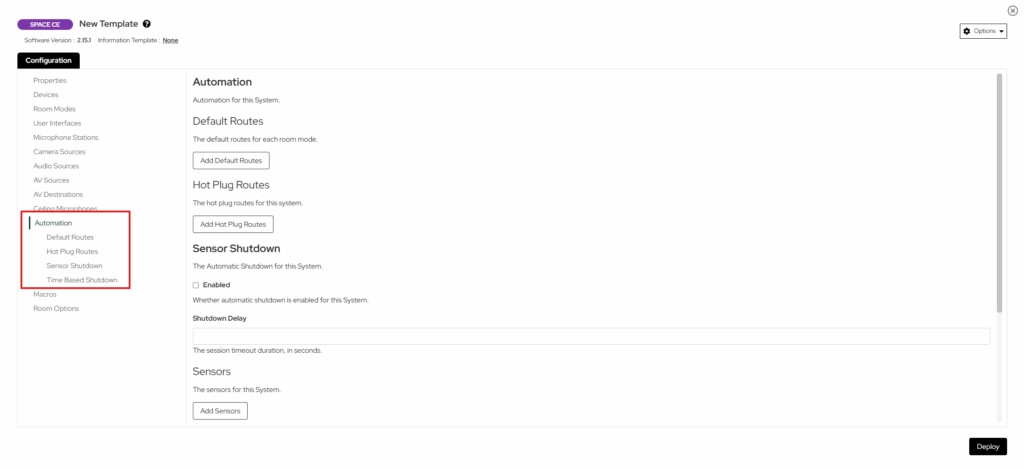
Default Routes
The Default Routes section specifies which source should be automatically routed when the room transitions into a particular Room Mode. You can add a new route by selecting “Add Default Route”. Once define/d, whenever the room enters the specified mode, the configured source will automatically route to the specified destination type(s).
Example Use Case:
If you want the PC source to automatically route to all displays when the room powers on, you would create a default route that triggers when the room transitions into the “Presentation”. See image below.
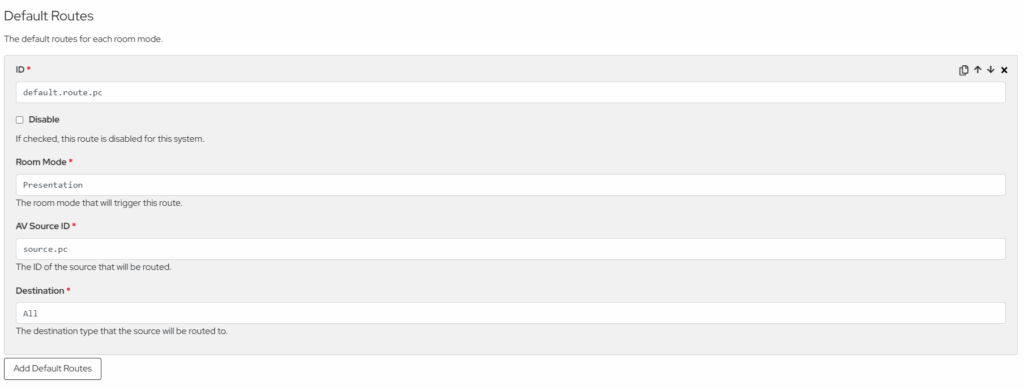
Below is a list of properties that a default route must be defined with.
| Property | Description |
| ID | The unique ID of the route. |
| Disable | Check to disable this route. |
| Room Mode | The room mode that will trigger the defined route. |
| AV Source ID | The ID of the source to be routed. Defined under the AV Sources section. |
| Destination | The destination type that the source will be routed to. |
Hot Plug Routes
Hot Plug Routes define routing behaviour when source sync is detected (e.g. when a laptop is connected via HDMI). If the room is off when a Hot Plug Route is triggered it will power the room on then execute the defined route. If the room is on, the route will be executed immediately.
If a routed source loses sync, the system will attempt to find another Hot Plug Route with a source that has sync and route it. If no valid Hot Plug Route is found, the system will attempt to route a Default Route for the same destination. If no suitable route exists, the “None” source will be routed to that destination.
Example Use Case:
A Laptop Input is connected and automatically routed to all displays. When the laptop is disconnected, the room reverts to the default PC source (or “None” if no default route is defined).
| Property | Description |
| ID | The unique ID of the route. |
| Disable | Check to disable this route. |
| AV Source ID | The ID of the source to be routed. Defined under the AV Sources Section. |
| Destination | The destination type that the source will be routed to. |
EWIS
The EWIS (Early Warning and Intercommunication System) section allows you to define sensors that detect fire and emergency triggers within the room. Each
EWIS sensor is linked to a device configured under the Devices section.
EWIS sensors can be connected through two types of devices:
- Digital IO – The sensor monitors a specific channel on a Digital IO device. The Trigger Method determines how the signal is interpreted — for example,
a “Normally Closed” sensor treats an open circuit as a triggered state. - DSP – The sensor monitors signal presence on a specific DSP block. This requires a Block ID to identify which block to listen to. When signal is detected on that block, the sensor is considered triggered. When any EWIS sensor is triggered, the system will send a warning notification to the UI. The warning is automatically cleared once all sensors return to their normal state.
| Property | Description |
| ID | The unique ID for this EWIS sensor. |
| Device ID | The ID of the device that is use to trigger EWIS, defined under Devices.(Digital io or Dsp) |
| Block ID | The DSP block ID. Only required for DSP-based triggers. |
| Channel ID | The channel number for this trigger. Defaults to 0. |
| Trigger Method | Whether the trigger to activate EWIS is normally open or normally closed. Defaults to Normally Closed. |